Hospitality
Restaurant POS System: Features That Speed Up Service and Cut Waste
Restaurants run on tight margins and tighter timelines. The right POS system reduces order errors, keeps the kitchen informed in real time, and gives management the shift-level data needed to make every service more profitable than the last.
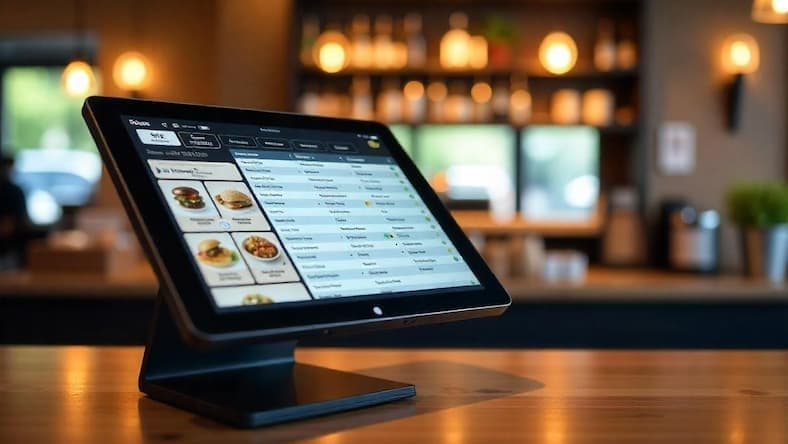
Running a restaurant is operationally different from running a retail shop. Orders are customised, service has multiple stages, tables turn multiple times in an evening, and a single mix-up in the kitchen can create a cascade of complaints. A POS system designed for retail will fail in this environment. A restaurant POS is built around the flow of a dining experience — from the moment a table is seated to the moment the bill is settled.
The features that separate a capable restaurant POS from a basic billing system are not cosmetic. They directly affect service speed, food cost, and manager control.
Table management and order routing
A floor plan view lets front-of-house staff see which tables are occupied, how long they have been seated, and which orders are still open. Orders placed at the table route directly to the kitchen display or printer — no paper tickets, no shouting across the pass, no misread handwriting. When a customer asks to move tables, the open order moves with them.
Order modifiers and special requests
Restaurant customers customise everything: no onions, extra sauce, change the side, make it a half portion. A modern POS handles modifiers at the item level — the kitchen sees exactly what was ordered, and the price adjusts automatically for additions. This eliminates the most common source of kitchen errors and re-fires.
Kitchen display system (KDS) integration
Instead of printed chits that pile up and get lost, a kitchen display screen shows every open order in real time, colour-coded by time elapsed. Kitchen staff mark items as prepared, which updates the front-of-house view so servers know when food is ready. During a busy service, this alone reduces ticket times significantly.
Split bills and flexible payment
Groups split bills in every combination imaginable — by person, by item, or in equal shares. A restaurant POS handles all of these without the cashier reaching for a calculator. Payment methods — cash, M-PESA, card — can be mixed on the same bill. Receipts go out by email or WhatsApp for tables that prefer digital.
Inventory linked to recipes
Every dish sold depletes the ingredients that made it. When the POS is connected to recipe-level inventory, managers can see theoretical versus actual stock at the end of each service. The gap between the two is food waste, over-portioning, or shrinkage — all of which are invisible without this data. Accurate ingredient tracking also makes procurement more precise: you reorder what you actually need, not what you guess.
Shift reporting and cashier accountability
End-of-shift reports show total sales, voids, discounts, and payment method breakdowns per cashier. Managers can see immediately if voids are unusually high or if a particular payment method is being underreported. Combined with a cash float count at open and close, the system creates accountability without accusation.
Questions to ask before choosing a restaurant POS
- Does it support table layouts and order routing to a kitchen display?
- Can it handle item modifiers with price adjustments?
- Does it support M-PESA, card, and split payments on the same bill?
- Is there recipe-level inventory tracking built in?
- Will it work offline if the internet drops mid-service?
- Can it scale to multiple outlets under one management dashboard?
- Is there a local support team available during service hours?
Built for hospitality businesses
Tessera POS supports restaurants, cafes, and hospitality operations — with table management, kitchen routing, flexible payments, and inventory tracking designed for how food businesses actually run.
Related Solutions
Products that match this guide
Tessera POS
Run fast checkout, inventory sync, M-PESA payments, branch reporting, and retail controls.
Explore Tessera POSTERP Accounting
Manage reconciliations, AP/AR, VAT reporting, budgets, cashflow, and audit-ready controls.
Explore AccountingTessera ERP
Connect inventory, purchasing, accounting, HR, POS, and reporting in one business platform.
Explore Tessera ERPKeep Reading
More Articles
How to Run a Multi-Store Business Like a Pro
Learn how to efficiently operate businesses with multiple locations and warehouses. Discover strategies, best practices, and how ERP systems can help streamline your operations.
Read article →
ERP Modules Every Business Should Prioritize First
Not every ERP rollout should start with every module. Here is how to prioritize the modules that create the fastest operational impact.
Read article →
ERP System for Growing Businesses: When Spreadsheets Stop Being Enough
A practical guide to when a growing business should move to an ERP system, what pain points it solves, and what to evaluate before rollout.
Read article →